1.Verify Network and Basic Configuration
- Ensure the A416 and door station are on the same local area network (LAN).
- Confirm they are configured with the same building and same unit on both devices.
2.Search and Save Door Station on Indoor Monitor
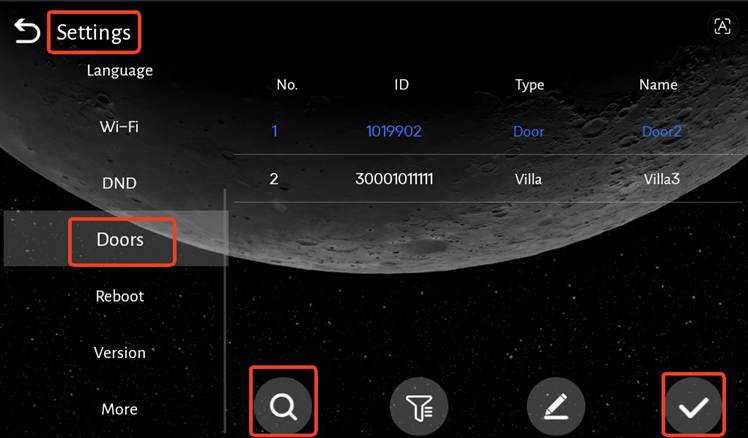
- On the A416, go to Settings → Doors.
- Tap the search icon to discover door stations within the same LAN, building and unit.
Note:If it is a villa station, the building Unit and Apartment No. need to be set to the same as the indoor monitor.
- Select the target door station and tap the check icon to save the configuration.
3.Test Door Station Access on Indoor Monitor
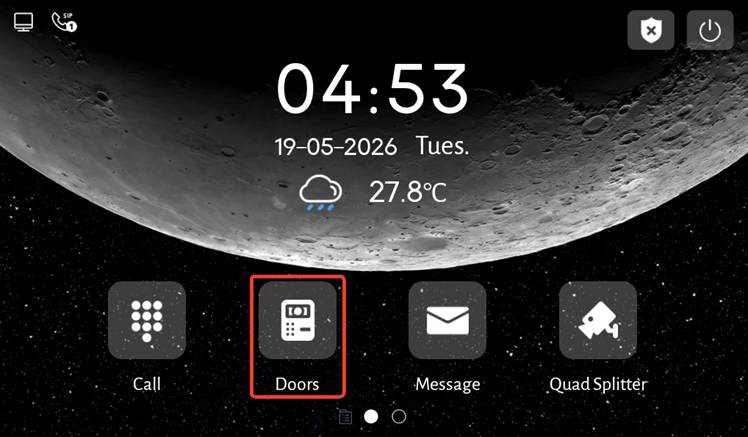
- Return to the indoor monitor home screen and tap the Doors icon.
- Check if you can monitor the door station video and unlock the door.
- If the functions fail, re-enter Settings → Doors to confirm the door station is correctly selected and saved.
4.Check Door Station Display and Functions on APP
- When the A416 can normally monitor and unlock the door station:
- The saved door station will automatically appear on the APP.
- Use the APP to perform monitoring, intercom, and unlocking.
5.Contact DNAKE Technical Support (If Issue Persists)
- If the door station still does not appear on the APP, or appears but cannot monitor, intercom, or unlock,Prepare the following information:
- Capture APP logs.
- Record a video showing the issue.
- A416 and door station firmware version
- APP version
- Submit all above info to the DNAKE technical support team for further diagnosis.
Was this article helpful?
That’s Great!
Thank you for your feedback
Sorry! We couldn't be helpful
Thank you for your feedback
Feedback sent
We appreciate your effort and will try to fix the article