1. Network Preparation
Connect your PC and the target device to the same Local Area Network (LAN).
Ensure the first three segments of the IP address are identical
Example:192.168.68.xxx
2. Access the Device Web Interface
Open a web browser on your PC
Enter the IP address of the target device
Press Enter
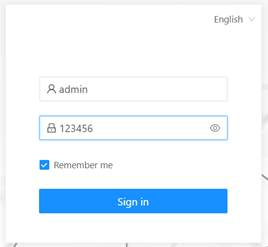
Login Credentials:
Username:
adminPassword:
123456
3. Export Device Configuration
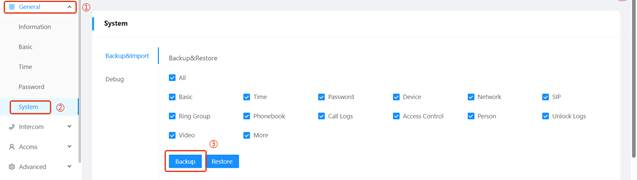
Navigate to:
General → System → Backup
Export all device settings
This file will be used to reproduce and analyze the issue
4. Capture Logs
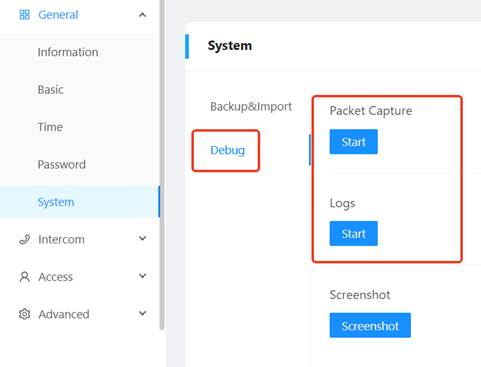
Go to the Debug tab
Start capturing:
Packet Logs
Device Logs
5. Reproduce the Issue
Perform the steps on the affected device that trigger the issue
After completing the process, click Stop on the web interface
This ensures the logs cover the full sequence of events.
Note:
Record the exact timestamp when the issue occurs.
Example: June 1, 2025, 16:45
6. Submit Files for Analysis
Please send the following:
Exported configuration file
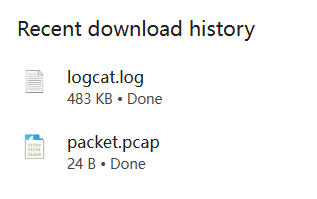
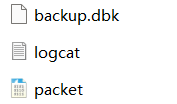
Captured logs (automatically downloaded after clicking “Stop”)
Detailed steps to reproduce the issue
Device firmware version
We will begin analysis once all required materials are received.
Was this article helpful?
That’s Great!
Thank you for your feedback
Sorry! We couldn't be helpful
Thank you for your feedback
Feedback sent
We appreciate your effort and will try to fix the article