CGI Command Example
http://192.168.3.119/cgi-bin/webapi.cgi?api=unlock&index=2&username=admin&password=E10ADC3949BA59ABBE56E057F20F883E
1. Verify Network and IP Address
- Check the IP address of the door station
- Ensure the PC and door station are in the same subnet
2. Confirm Relay Index Mapping
The value of index represents the relay number:
- Relay 1 = 0
- Relay 2 = 1
- Relay 3 = 2
Note:
Please confirm the number of relays supported by your specific door station model.
Please confirm the number of relays supported by your specific door station model.
3. Verify Password (MD5 Encryption)
The password field refers to the administrator password in MD5 format.
Example MD5 value:
E10ADC3949BA59ABBE56E057F20F883E
E10ADC3949BA59ABBE56E057F20F883E
- This is the MD5 hash of default password “123456”
- Users must generate the MD5 hash based on their actual password
- Replace the value in the CGI command accordingly
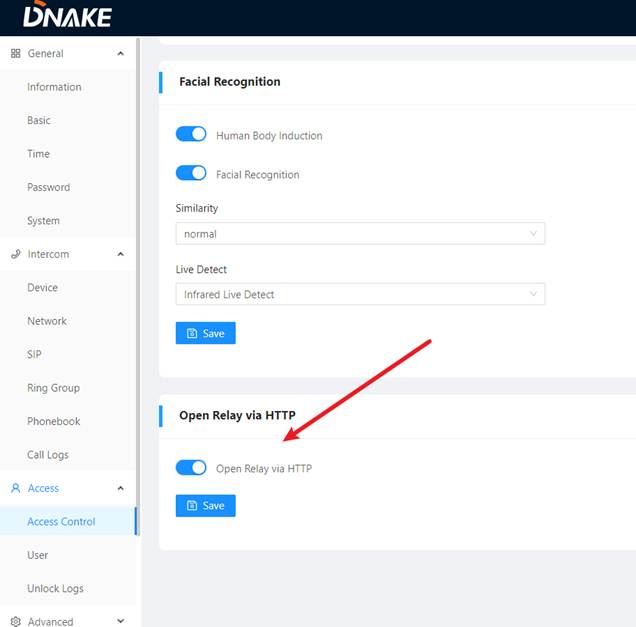
4. Enable HTTP Relay Control
Ensure the following option is enabled on the door station web interface:
- Open relay via HTTP = Enabled
5. Test CGI Command
Paste the CGI command into a browser and execute it.
Expected Result:
If the system returns “200”, the function is operating normally.
If the system returns “200”, the function is operating normally.
Was this article helpful?
That’s Great!
Thank you for your feedback
Sorry! We couldn't be helpful
Thank you for your feedback
Feedback sent
We appreciate your effort and will try to fix the article