- If the S215 door station shows a blank blue screen or gets fully frozen, and no buttons respond at all, please provide the S215 firmware version and a video recording of the fault to DNAKE Technical Support Team.
- Follow the remote guidance from DNAKE technical staff to perform USB flashing.
- If the S215 still fails to work normally after USB flashing, please export and submit the device log for further analysis.
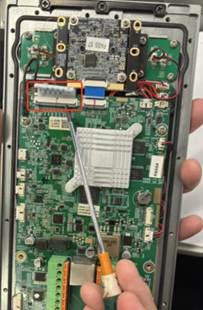
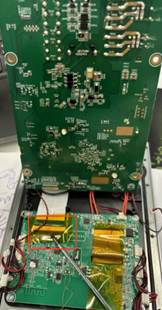
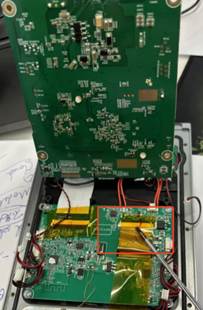
- After log inspection, if the issue is confirmed to be caused by poor connection of the screen cable, disassemble the device and re-plug the screen connector cables properly.
- Please break it open and put the parts back as indicated in the three pictures in turn, and then try turning the device on.
- If the problem is diagnosed as a defective screen or other hardware failure:
- For devices within the warranty period: Contact the DNAKE sale engineer to initiate the RMA process.
- For devices out of warranty: Customer needs to bear the relevant shipping and maintenance fees. Please consult DNAKE sale engineer for detailed arrangements.
Was this article helpful?
That’s Great!
Thank you for your feedback
Sorry! We couldn't be helpful
Thank you for your feedback
Feedback sent
We appreciate your effort and will try to fix the article