1: Verify Value-Added License Assignment
Ensure that the corresponding Apartment has been assigned a value-added license. If not, assign the license and retest.
2: Verify Landline Configuration
- Check the phone number configured in the Landline settings:
-Navigate to the Landline configuration interface. Verify that the phone number is reachable and correctly formatted according to local telephone number standards.
Common format examples:
US: +1-XXX-XXX-XXXX
UK: +44-XXXX-XXXXXX
- Test the number manually to confirm it can be connected.
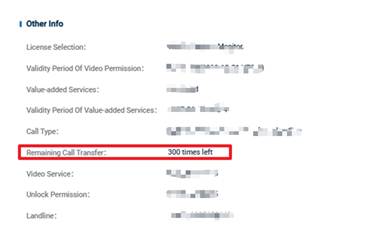
3: Check Remaining Call Transfer Credits
- Ensure that the Remain Call Transfer has sufficient remaining credits. Check the current balance of call transfer credits in the system.
- If the call transfer time are exhausted, the call will fail. Replenish as needed and retest.
Refer to the screenshot below for reference (insert reference image here).
4: Escalate to Dnake Support
If the issue persists after completing all previous steps, please collect the following information and escalate to the internal engineering team for further investigation:
- Device Model & Firmware Version
Provide the exact model number and current firmware version of the access device.
- Logs & Network Capture
Export a complete log and network packet capture during the entire landline calling process.
- Historical Status & Environment Changes
Confirm whether the feature was working properly before, and provide details of any recent changes to the device environment (e.g., network changes, firmware updates, configuration modifications, etc.).
Was this article helpful?
That’s Great!
Thank you for your feedback
Sorry! We couldn't be helpful
Thank you for your feedback
Feedback sent
We appreciate your effort and will try to fix the article