First, log in the device’s web configuration page with account (admin) and password (123456).
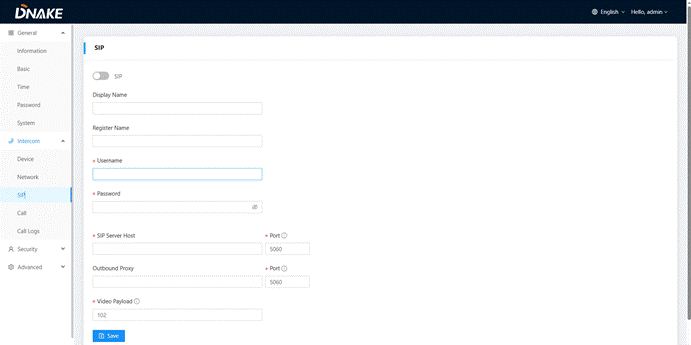
Then, access the “Intercom”--->"SIP", the SIP column concerns SIP registration, Display Name, Register Name, Username, Password, SIP Server Host, Outbound Proxy, Transport Protocol, Video Payload, etc.
The parameter information is as follow
SIP: | Enable to use SIP; |
Display Name: | Display name of SIP account; |
Register Name: | Register Name of SIP account; |
Username: | Username of SIP account; |
Password: | Password of SIP account; |
SIP Server Host:
| Directly fill in SIP server’s address e.g., 192.168.68.90;The default port is 5060; |
Outbound Proxy: | Outbound Proxy server; the default port is 5060; |
Transport Protocol: | Transport Protocol (UDP); |
Video Payload: | Video payload range is 96-127; |
Was this article helpful?
That’s Great!
Thank you for your feedback
Sorry! We couldn't be helpful
Thank you for your feedback
Feedback sent
We appreciate your effort and will try to fix the article