First, log in the device’s web configuration page with account (admin) and password (123456).
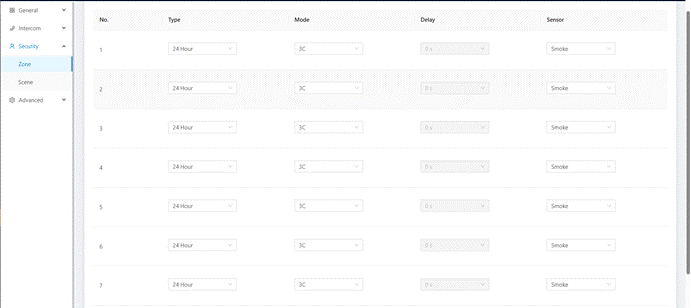
Then, access the “Security”--->"Zone", zone column is the setup page for security sensors.
Type: | Normal: When users enable an alarm scene on the On/Off page, Normal type alarm zone will be activated after activation time. o 100 seconds is the default activation time, it means the alarm will be activated after 100seconds. o After 100s, once sensor is triggered, Indoor Monitor will send this alarm to Master Station. o But sometimes users don't want to send the alarm to Master Station (maybe alarm by mistake), users can set the Delay time, so they can cancel the alarm in the Indoor Monitor during this Delay time (PIR, Door, Window); Emergency: once Panic button is triggered, Indoor Monitor will not initiate an alarm and only Master Station will receive alarms secretly; 24 hours standby even if the security is off (Panic, Pull Cord);24 Hour: Indoor Monitor will initiate an alarm and Master Station will also receive alarms. 24 hours standby even if the security is off (Smoke, Gas, Flood); |
Mode: | 3C: for the sensor with 2.2KΩ resistance; Regardless of the connection to NC or NO, the alarm can be triggered normally; NO: normally open; NC: normally closed; BELL: in BELL mode, Master Station will not receive any alarm. Indoor Monitor is regarded as a doorbell receiver; |
Delay: | Once sensor is triggered, Indoor Monitor will send this alarm to Master Station, but users can terminate the alarm sending to Master Station during the delayed time set here. Delay setting is only effective for Normal type (0s, 5s, 15s, 20s, 25s, 40s, 60s); |
Sensor: | Sensor types (Smoke, Gas, PIR, Door, Window, Panic, Flood, Pull Cord); |
Was this article helpful?
That’s Great!
Thank you for your feedback
Sorry! We couldn't be helpful
Thank you for your feedback
Feedback sent
We appreciate your effort and will try to fix the article